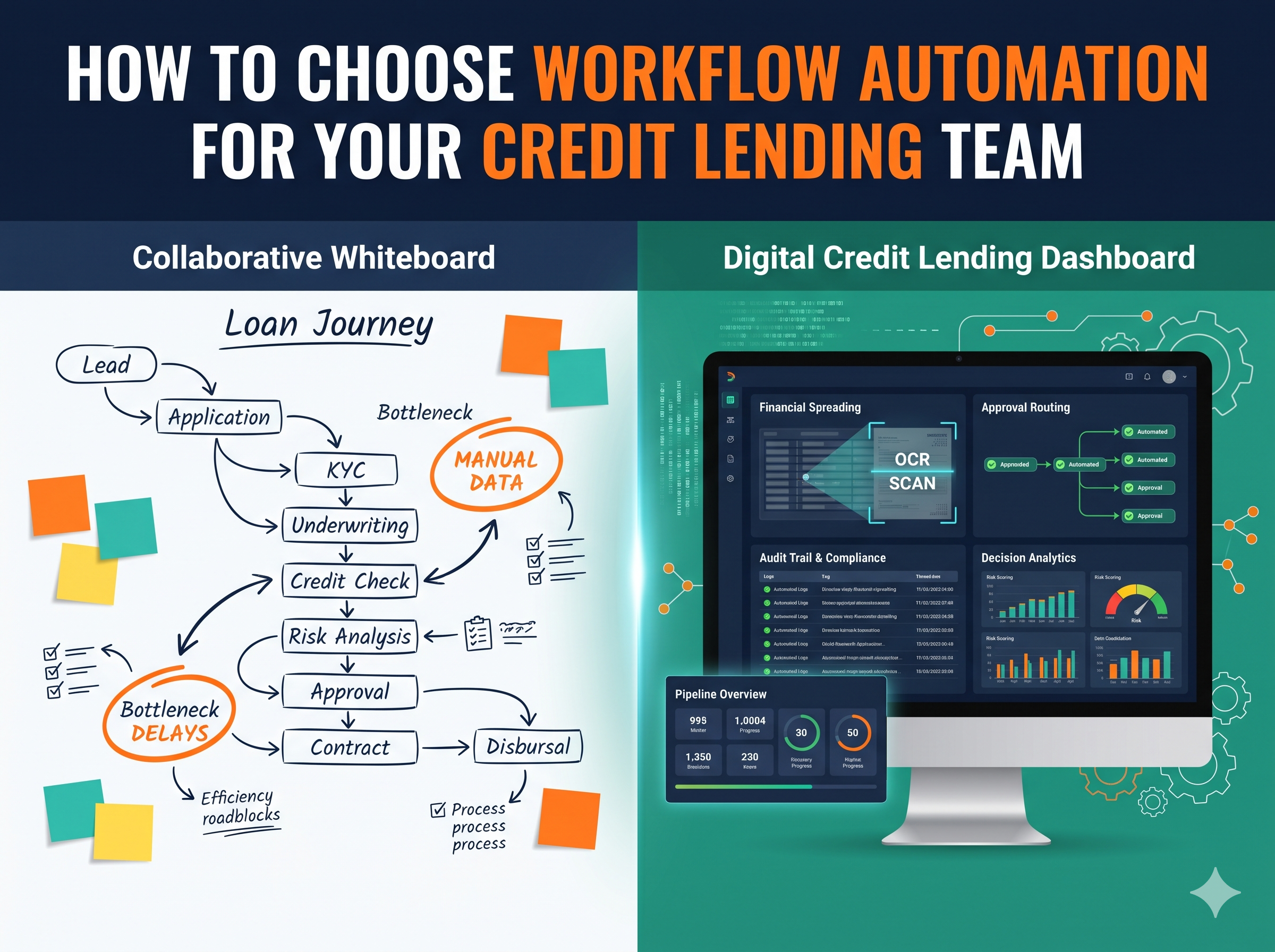
Choosing workflow automation for a credit lending team means finding a tool that fits how your team already decides and documents credit. The teams that get this right map their process first, then test vendors against the work they need it to do.
Map the loan journey before you shop
Start with a whiteboard, not a demo. Trace a file from first contact through collection, analysis, approval, and funding. Write down who touches it and what system they use at each step. Look for files waiting on missing documents or a sign-off no one flagged. Separate active analysis time from time spent waiting in queues.
Teams that skip this step can pay for it later. They automate intake while the real jam is in credit analysis and memo prep. Or they buy routing while analysts still rekey financials from PDFs into spreadsheets. Mapping shows you where time goes and where errors creep in, giving you a baseline to use when vendors talk about speed. It also stops debates later about what improved.
Keep the map honest. Include rework loops and side chats, along with the time analysts spend preparing credit committee papers. Include exception pricing and the late-stage conditions that send files back to the borrower. If your map doesn’t show pain, you haven’t asked enough people. Talk to underwriters and loan officers separately, because each group sees a different bottleneck.
Don’t clean it up for vendors. A messy map is more useful than a neat one because it shows what must change before anything gets automated.
Pick your automation scope first
One reason selections go wrong is scope. Teams ask for end-to-end automation when they need help with one hard part. Or they buy a point fix when the whole chain is manual. Be clear about which pain you want to remove first. That choice shapes everything else.
Financial spreading is a common starting point. Analysts pull statements and tax returns, then rekey numbers for ratios and cash flow. Automation here pulls data and runs checks that flag gaps. Approval routing is a different job. It moves the file through underwriter, senior approver, committee, and final docs based on amount and risk grade. End-to-end automation connects stages such as intake, spreading, routing, and funding. Straight-through processing may suit defined tasks, but a complete file should not bypass required credit approval.
The order matters as much as the scope. If spreading eats most hours, start there. If decisions stall waiting for sign-offs, start with routing. Don’t try to fix both at once unless you have the staff to test both. A narrow win builds trust faster than a broad rollout that drags.
Volume and mix matter here. Standard loans at pace point to broader flows, while unusual deals point to focused help.
Narrow scope makes the pilot measurable.
Sort vendors into three buckets
The market is noisy. Every vendor says workflow, but they mean different things. It helps to sort them into three groups before you book demos. That way you don’t compare a loan origination system to a bot and wonder why the pricing looks odd.
Loan origination systems typically cover the journey from application through closing. Depending on the product, they may combine intake, documents, decision support, and closing tasks. They can suit teams seeking a shared origination platform. General workflow tools coordinate tasks across existing systems, while robotic process automation can handle repetitive interface-based actions. Neither category automatically provides lending-specific controls, so test those separately.
Specialist credit tools focus on narrower activities such as financial spreading, scoring, or policy checks. A spreading tool does not necessarily make credit decisions, and a routing tool may simply send work to authorized staff. These products can complement an existing origination platform rather than replace it. Ask each vendor which activities it supports, which require another system, and where a person remains responsible. Product categories overlap, so use them to frame questions rather than assume features.
These buckets give the review team a shared way to discuss fit without treating unlike products as direct alternatives.
Check proof before you trust the demo
Demos always look smooth. Live files are not. Before you shortlist anyone, ask for proof from teams like yours. Ask for a reference lender with similar volume and product mix, including what broke during rollout and how long the first workflow took to go live. Vendors with real use will answer with detail. Others will talk in general terms.
A credit workflow automation client story from Evalueserve offers an example of phased implementation at a global bank. It describes introducing Spreadsmart to more than 120 team members and integrating it with the bank’s existing CreditLens decisioning platform. Built-in validations were part of the spreading solution.
That example gives buyers concrete questions to ask about implementation sequence, analyst adoption, and integration with existing systems. It is not a forecast for your own team. Request references from lenders with a comparable product mix, and compare their starting processes with yours before drawing conclusions about likely gains. Ask who owned the data and how exceptions were handled in daily work, because that matters more than polished slides.
Where confidentiality allows, ask to speak with a credit leader who used the system, not just an implementation sponsor. Find out what they would do differently.
Score the six buyer requirements that count
Once you have proof, score what matters. Group buyer needs into six areas and weight them for your team before demos start, so a slick interface can’t hide a weak fit.
First is integration. Can the tool pull from your core and CRM without rekeying and push updates back the same way? Check whether it can also pull bureau data, bank statements, identity checks, and tax records early in the flow. If staff must download and upload between systems, you’ve moved work rather than removed it. Clean data in means fewer returns to the borrower.
Second is routing that matches your credit authority matrix. Test whether limits by amount and risk grade send files to underwriter and senior approver in the right order, with auto-escalation when someone is out or when a file sits too long. Your committee needs formal support too. Look for calendars, memo packs, sign-offs, and minutes within the flow, with shadow steps for training without granting limit power.
Third is control. Check for role-based access and a full audit trail that shows who viewed and edited each file. Look for version history for policy rules so you can tell what rule ran on what date. Also test timers for decision notices and decline letters so files don’t sit past internal standards. Treat these as checks to test, not promises to trust.
Fourth is reporting you will actually use. Look for average decision turnaround and touches per file by product and by underwriter, plus reason codes on declines so you can see why files fail. Fifth is low-code control for your own staff. Can credit admins change thresholds and routing in hours without waiting on IT? Ask how long a first live change takes after training.
Sixth is security and fit for sensitive data. Ask how data is encrypted in transit and at rest, where it is hosted, and how access is logged. Ask about independent reviews of controls. If scoring or rules sit inside the flow, ask how the team tests for fair outcomes and where human judgment stays in the loop. Keep a human approver on exceptions and edge cases. Automation must support judgment, not replace it.
Run a scenario demo and a tight pilot
Skip the canned demo. Prepare two synthetic or appropriately de-identified files: one complete file that should follow the standard approval path, and one with missing documents and a policy exception. Do not share borrower information before security and contractual checks are complete. Watch how the tool pulls data and flags gaps, then routes to the authorized approver. Check that a workflow status change cannot silently become a credit decision.
Score fast while it’s fresh. Use the six areas above with weights that match your pain. If routing delays hurt most, weight routing and reporting higher. If rekeying hurts most, weight integration and spreading higher. Keep notes tied to what you saw, not what the deck said. Total the scores as a team, using a sheet simple enough to work with in the room. Don’t let one loud voice swing the pick.
Pilot on one product line or one branch group. Set acceptance rules before you start. Name the baseline and the target for decision turnaround, touches per file, rework rate, and cost per file so both sides know what good looks like. Name who must adopt it and how often. Run long enough to see exceptions and month-end pressure. If the pilot misses, you learn at limited cost. If it hits, you have a case built on your own numbers.
Every pilot will hit bumps, and seeing how the team handles them is part of the point.
Get the team ready to live with the choice
Tools fail when people don’t use them. Bring analysts and loan officers into design early, and let them shape screens and handoffs. Keep policy owners in the loop when rules change. Training isn’t a one-day event. It is practice with live files and clear help when something looks off. Small wins early beat big promises later.
Roles shift after go-live. Someone must own the rules, data links, queues, and access. Without an owner, routing goes stale and workarounds grow. Name that owner before rollout, with time each week to review reason codes and turnaround by approver and to tune thresholds with credit leaders.
Keep judgment where it belongs. Let automation gather facts and enforce steps. Keep credit decisions with people who can weigh context and explain the call. Test changes with old files before you release them. Track where data came from so you can defend each decision later.
The right choice feels boring in the best way. Files move, owners know their queues, and leaders can see why each call was made. Pick the tool your team will trust on a busy Friday, not the one that shines in a sales room.