Apple Music offers a vast library of over 100 million songs, but there’s a catch most users don’t realize until it’s too late: you don’t actually own the music you download. Those tracks are protected by DRM (Digital Rights Management), specifically Apple’s FairPlay encryption, which ties every downloaded file to your Apple ID and subscription status.
The moment you cancel your subscription, every single song you’ve “downloaded” becomes unplayable. This limitation extends beyond subscription lapses—you also can’t transfer Apple Music songs to older iPods, MP3 players, Android devices, or use them in creative projects like video backgrounds, DJ mixes, or ringtones.
This guide will show you how to download Apple Music songs permanently using ViWizard Apple Music Converter, the professional solution trusted by music enthusiasts worldwide.
Why Standard Apple Music Downloads Fall Short
When you download songs through the official Apple Music app, the files have an .m4p extension—the “p” stands for “Protected”. These files are encrypted and contain a digital key that periodically checks your subscription status with Apple’s servers.
This means:
- Downloaded tracks become inaccessible without an active subscription
- Files cannot be transferred to non-Apple devices or older media players
- You can’t use Apple Music tracks in DJ software, video editing, or other creative applications
- The built-in “Convert to MP3” option in iTunes doesn’t work for streaming music—it’s permanently greyed out
The Best Solution: ViWizard Apple Music Converter
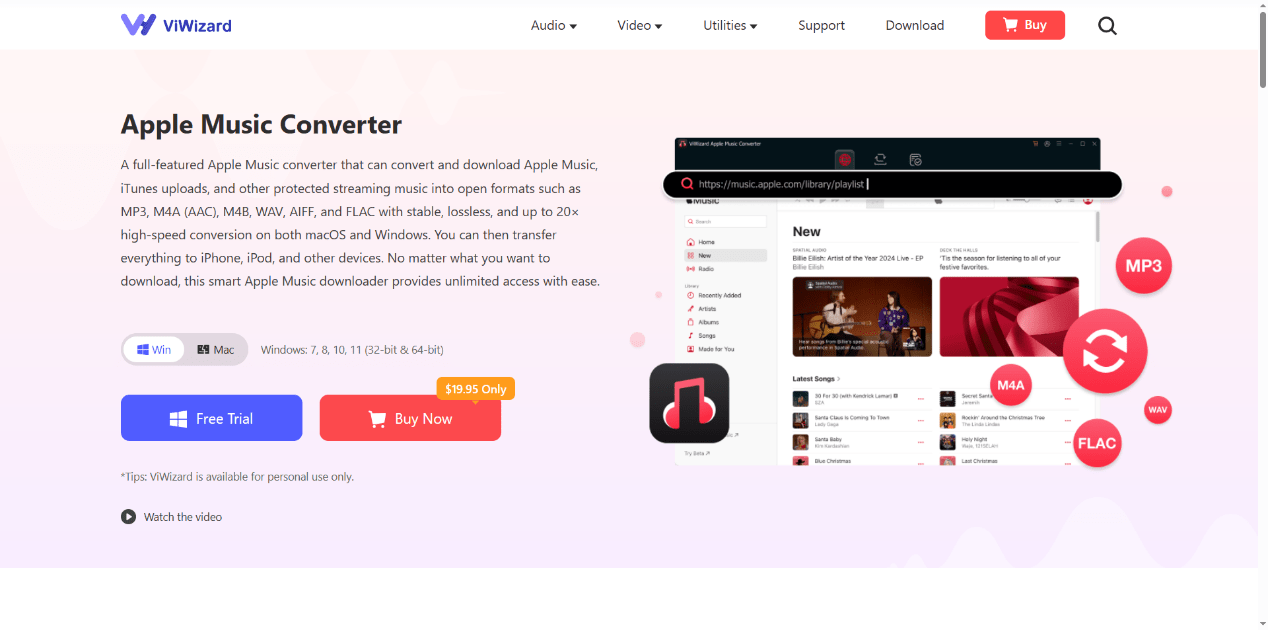
ViWizard Apple Music Converter is specifically designed to remove DRM protection from Apple Music tracks while converting them to open, universally compatible formats. Unlike screen-recording methods that destroy audio quality, ViWizard preserves the original audio fidelity while stripping away encryption.
Key Features That Set ViWizard Apart
High-Quality Output: The converter supports output formats including MP3, M4A, FLAC, WAV, and AIFF at up to 320 Kbps. For audiophiles, lossless formats like FLAC and WAV are available, preserving Apple Digital Masters in their original 24-bit studio quality.
Blazing-Fast Performance: Using advanced multi-thread technology, ViWizard processes tracks up to 30× faster than real-time. A full 50-track playlist converts in just minutes.
Preserves Metadata: All ID3 tags including song titles, artists, album artwork, and genre information are automatically retained. Your music library stays perfectly organized without manual sorting.
Built-in Apple Music Web Player: ViWizard includes an integrated browser that gives you full access to your Apple Music library and the complete Apple Music catalog—no separate app required.
Batch Conversion: Select entire playlists or albums for conversion simultaneously, with no limits on the number of songs you can process.
Step-by-Step Guide: Download Apple Music Songs Permanently
Step 1: Download and Install ViWizard
Download ViWizard Apple Music Converter from the official website and install it on your Windows PC or Mac. The installation process is straightforward and guided by on-screen instructions.
Step 2: Sign in to Your Apple Music Account
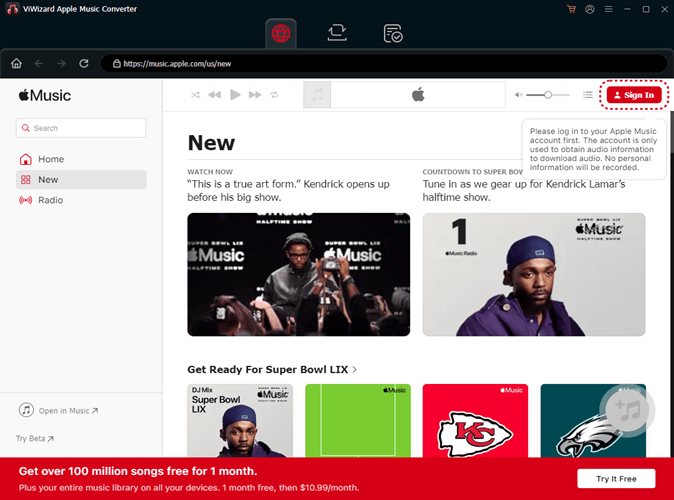
Launch the application. The built-in Apple Music Web Player will automatically open. Click the “Sign In” button in the bottom-left corner and enter your Apple ID credentials. This grants ViWizard access to your music library and the Apple Music catalog.
Step 3: Configure Output Settings
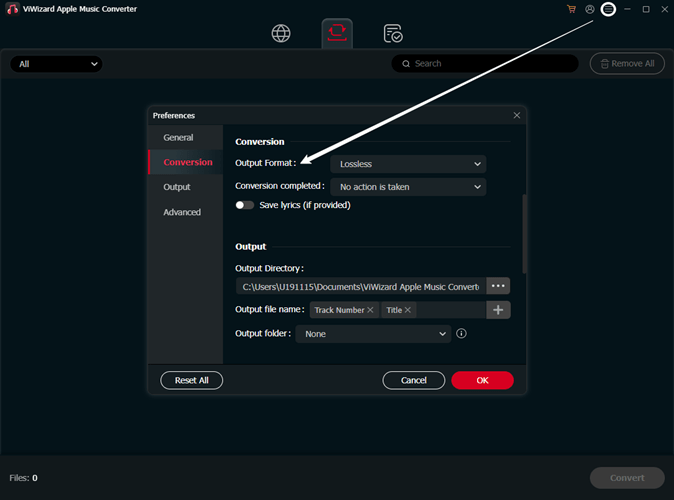
Click the menu icon (☰) in the top-right corner and select Preferences. Choose your desired output format:
- MP3: Best for maximum compatibility across all devices (320 Kbps recommended for high quality)
- FLAC/WAV: Lossless formats for audiophiles who demand perfect audio quality
- M4A: Balanced options with good quality and reasonable file sizes
You can also customize bit rate, sample rate, output folder location, and file naming preferences.
Step 4: Select Music for Conversion
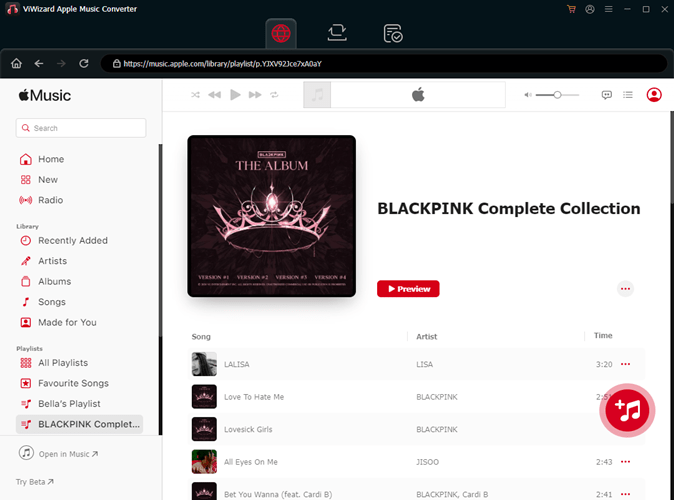
Browse through your Apple Music library or the Apple Music catalog using the built-in web player. Find the songs, albums, or playlists you want to download permanently. Click the “+” button next to your selections to add them to the conversion list.
Step 5: Convert and Download
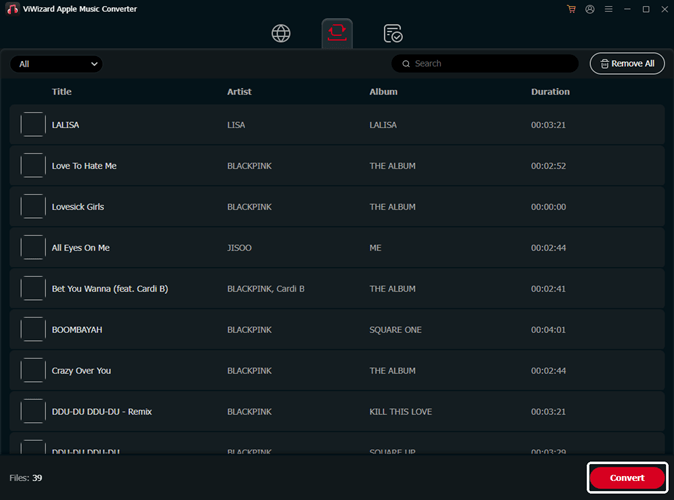
Click the big “Convert” button to begin the process. ViWizard will process your selected tracks, remove DRM protection, and save them as standard audio files in your chosen output folder.
Once conversion is complete, you’ll find your Apple Music songs as regular audio files that work on any device, anywhere, forever—even after your Apple Music subscription ends.
Practical Uses for Converted Apple Music Files
After converting your Apple Music songs with ViWizard, you can:
- Transfer music to older iPods (Classic, Nano, Shuffle) that don’t support Apple Music
- Play tracks on Android phones, Windows devices, and car stereos
- Use songs as ringtones, alarm sounds, or video background music
- Mix tracks in DJ software like Virtual DJ
- Create permanent backups of your entire library
- Keep listening after canceling your subscription
Conclusion
Downloading Apple Music songs permanently is impossible through official channels due to DRM restrictions. However, ViWizard Apple Music Converter provides the only reliable solution for removing these limitations. Whether you want to back up your library, use music on unsupported devices, or maintain access after canceling your subscription, ViWizard delivers professional results with exceptional audio quality.